Voice authentication KPIs
This dashboard shows visual reports for authentication KPIs.
Voice Authentication KPIs grid
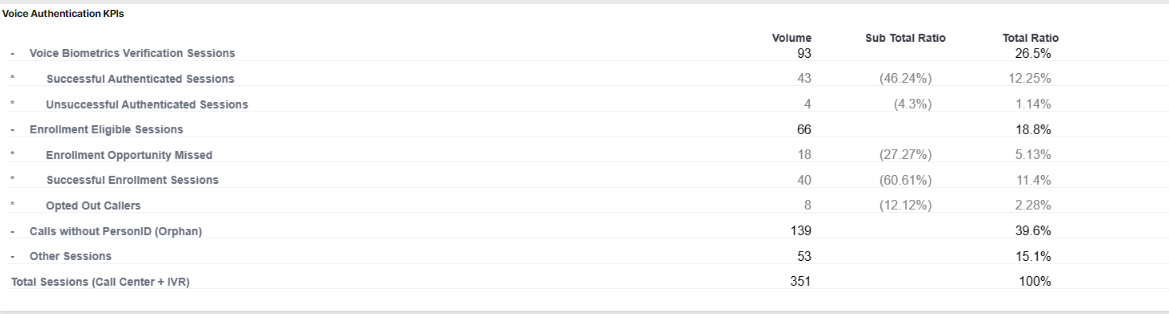
The following table describes the elements of the Voice Authentication KPIs grid:
| Element | Description |
|---|---|
| Visualization | Voice Authentication KPIs grid |
| Description | Displays several voice authentication KPIs. Data refers to a specific scope. |
| Type | Table |
| Custom Widget | Created using the Vega-Lite language. KQL language doesn’t apply to this widget. Usually filtered by data center, business type, or other relevant attributes. |
| Filter | Engagement creation timestamp (date and time) KQL language Business type |
| Linkable Entity | None |
| Implicit Filter | Filter applies to: Session Type, Session Decision, Factor Type, Factor Status Code Some implicit filters:
initial_voiceprint_profile_train_status not equal VOICEPRINT_PROFILE_STATUS_BASIC_TRAINED AND initial_voiceprint_profile_train_status not equal VOICEPRINT_PROFILE_STATUS_OPTIMAL_TRAINED AND (final_voiceprint_profile_train_status equal VOICEPRINT_PROFILE_STATUS_BASIC_TRAINED OR final_voiceprint_profile_train_status equal VOICEPRINT_PROFILE_STATUS_OPTIMAL_TRAINED) |
The following table describes each row in the Voice authentication KPIs grid:
| Name | Description | Query | Sub-total Ratio | Total Ratio |
|---|---|---|---|---|
| Total Sessions (Call Center + IVR) | Total number of sessions handled for contact center and IVR, excluding the empty sessions. | sessions.empty_session = false and (Session Type = SESSION_TYPE_CALL_CENTER or SESSION_TYPE_IVR) | ||
| Voice Biometrics Verification Sessions | Total number of sessions where a voice biometric verification or identification occurred. | (Factor Type = FACTOR_TYPE_IDENTIFY_VOICEPRINT or FACTOR_TYPE_VERIFY_VOICEPRINT) and Factor Status Code = OK | Percentage (%) ratio between Voice Biometrics Verification Sessions and Total Sessions (Call Center + IVR) | |
| Successful Voice Biometrics Verification Sessions | Total number of sessions who are already enrolled and have been successfully voice authenticated in their post-enrollment call. | (Factor Type = FACTOR_TYPE_IDENTIFY_VOICEPRINT or FACTOR_TYPE_VERIFY_VOICEPRINT) and Factor Status Code = OK and Session Decision = Authentic | Percentage (%) ratio between Successful Voice Biometrics Verification Sessions and Voice Biometrics Verification Sessions | Percentage (%) ratio between Successful Voice Biometrics Verification Sessions and Total Sessions (Call Center + IVR) |
| Unsuccessful Voice Biometrics Verification Sessions | Total number of sessions who are already enrolled and have not been successfully voice authenticated in their post-enrollment call (No Match result). | (Factor Type = FACTOR_TYPE_IDENTIFY_VOICEPRINT or FACTOR_TYPE_VERIFY_VOICEPRINT) and Factor Status Code = OK and Session Decision = No Match | Percentage (%) ratio between Unsuccessful Voice Biometrics Verification Sessions and Voice Biometrics Verification Sessions | Percentage (%) ratio between Unsuccessful Voice Biometrics Verification Sessions and Total Sessions (Call Center + IVR) |
| Enrollment Eligible Sessions | Number of sessions handled by agents and considered eligible for enrollment. | Sum of Enrollment Opportunity Missed, Successful Enrollment Sessions, and Opted Out Caller | Percentage (%) ratio between Enrollment Eligible Sessions and Total Sessions (Call Center + IVR) | |
| Enrollment Opportunity Missed | Number of sessions handled by agents that were ready for enrollment, but did not enroll due to the Enroll button not being clicked. | Not (Factor Type = FACTOR_TYPE_ENROLL_VOICEPRINT or FACTOR_TYPE_OPT_PERSON_OUT) and Factor Type = FACTOR_TYPE_PROCESS_AUDIO_FOR_ENROLL | Percentage (%) ratio between Enrollment Opportunity Missed and Enrollment Eligible Sessions | Percentage (%) ratio between Enrollment Opportunity Missed and Total Sessions (Call Center + IVR) |
| Successful Enrollment Sessions | Number of sessions successfully enrolled (Trained Voiceprints) | The widget selects SESSION_TYPE_CALL_CENTER where:initial_voiceprint_profile_train_status not equal VOICEPRINT_PROFILE_STATUS_BASIC_TRAINED AND initial_voiceprint_profile_train_status not equal VOICEPRINT_PROFILE_STATUS_OPTIMAL_TRAINED AND (final_voiceprint_profile_train_status equal VOICEPRINT_PROFILE_STATUS_BASIC_TRAINED OR final_voiceprint_profile_train_status equal VOICEPRINT_PROFILE_STATUS_OPTIMAL_TRAINED)Factor Type = FACTOR_TYPE_TRAIN_VOICEPRINT and Factor Status Code = OK |
Percentage (%) ratio between Successful Enrollment Sessions and Enrollment Eligible Sessions | Percentage (%) ratio between Successful Enrollment Sessions and Total Sessions (Call Center + IVR) |
| Opted out Callers | Callers that decided not to enroll and opted out. | Factor Type = FACTOR_TYPE_OPT_PERSON_OUT and sessions.final_consent_status_text = CONSENT_STATUS_OPTED_OUT | Percentage (%) ratio between Opted out callers and Enrollment Eligible Sessions | Percentage (%) ratio between Opted out callers and Total Sessions (Call Center + IVR) |
| Calls without PersonID (Orphan) | Number of sessions where a Person ID was not entered in the WAC | Session Intent = SESSION_INTENT_ORPHAN | Percentage (%) ratio between Calls without PersonID (Orphan) and Total Sessions (Call Center + IVR) | |
| Other Sessions | All others sessions. | Total Sessions (Call Center + IVR) - Calls without PersonID (Orphan) + Enrollment Eligible Sessions + Voice Biometrics Verification Sessions | Percentage (%) ratio between Other Sessions and Total Sessions (Call Center + IVR) |