Entra ID integration overview
The following diagram describes the Entra ID integration setup schema:
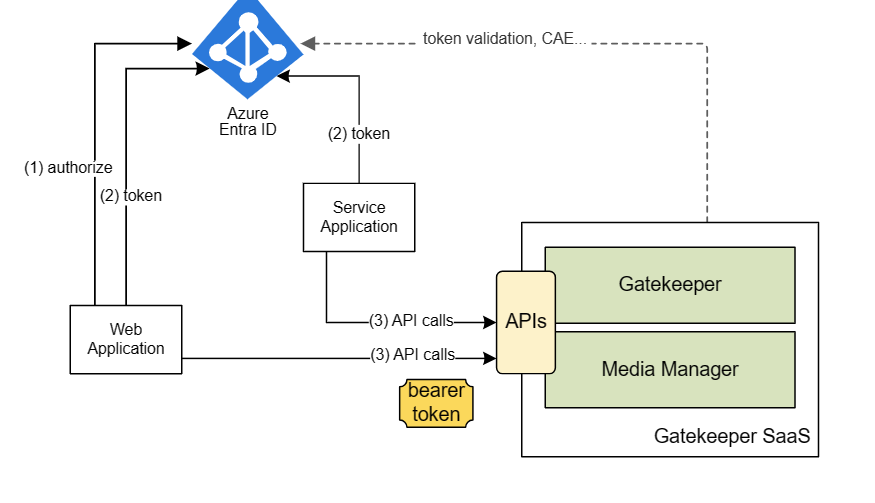
The following steps describe the Entra ID integration setup as shown in the above diagram:
-
(Only applicable to web applications) An application operating on behalf of a user redirects the browser to the Entra ID authorization endpoint. After the initial validation, Entra ID authenticates the user according to the user’s home tenant configuration. The user authentication process involves the customer’s IdP if the federation is configured for the customer’s Entra ID tenant. In case of a success, an authorization code is returned to the client application.
-
The client application (Web App/Service App) requests OAuth2 tokens using the appropriate credentials and, if applicable, the authorization code obtained previously. Entra ID issues the access token and a refresh token, if applicable.
-
Client application makes regular API calls using the bearer token until it expires. When the token expires, or if it’s rejected by the API, the client application retries the step 1 or 2, depending on the token type needed.
Entra ID App IDs
The following table describes the App IDs for Gatekeeper API, Media Manager API, Gatekeeper web portal, Web Agent Console, and Voice ID:
| App Name | ID |
|---|---|
<Gatekeeper API App ID> |
4cd7a620-c061-4d8b-9b0f-a3d8e251d65c |
<Gatekeeper Web Portal App ID> |
46d700d6-c4ac-4b9b-8271-9cd81cf39e01 |
<Media Manager API App ID> |
816d0393-fe17-450c-bd5a-2d2f23ef2b92 |
<Web Agent Console App ID> (Only used for deployments in Contact Center) |
9455b70c-5660-4ae8-94ae-3fcb4dde2593 |
Customer App IDs
The following table describes the Customer App IDs (service principal for customer tenant):
| App types | Description |
|---|---|
| Client application (such as IVR API developer) | Service principal with App ID in the customer tenant that’s used to generate the token to call the Gatekeeper API. |
| Media Connectors | Service principal with App ID for Media Connectors that’s used to generate the token to call the Media Manager API. |
| CTI Connectors | Service principal with App ID for CTI Connectors that’s used to generate the token to call the Media Manager API. |
| RCC Connectors | Service principal with App ID for RCC Connectors that’s used to generate the token to call the Media Manager API. |
OpenID Connect setup vs Entra ID setup
The key differences between OpenID Connect (OIDC) integration setup and Entra ID integration setup are as follows:
| OIDC integration setup | Entra ID integration setup |
|---|---|
| Hosts its own OAuth2 server | Uses Microsoft Entra ID (formerly Azure AD). Therefore, Entra ID setup doesn’t host the client identities anymore—they’re hosted by Entra ID, either in Microsoft (global multi-tenant apps such as Gatekeeper WAC) or customer’s tenant. |
| Relies on the external OIDC provider for user authentication | Relies on the Entra ID for user authentication. Entra ID setup supports all forms of client authentication offered by Entra ID. Additional functionality, such as Continuous Access Evaluation, is available with the Entra ID setup, as with any Entra ID-based apps. |
Object ID from User Info
The Object ID from the user info can either be a user principal name or first email address:
- If email field is set, the first email address is used.
- If the email field isn’t set, the user principal name is used.