Overview of APIs
Sites
The following table lists API sites and their authorization managers:
API technologies
Gatekeeper uses gRPC API technology stack with the following key characteristics:
- HTTP/2 is the transport for the native gRPC clients.
- TLS (1.2 and later enforced by default) is the encryption layer.
- gRPC defines the bindings for HTTP/2 primitives.
- Protobuf3 defines the protocol messages and methods.
- Oauth2 is used for client authorization.
- Where applicable, the identity of the end user is established by using OpenID Connect directly against the customer’s Identity Provider.
- gRPC-web is used by the Web application to communicate with the APIs.
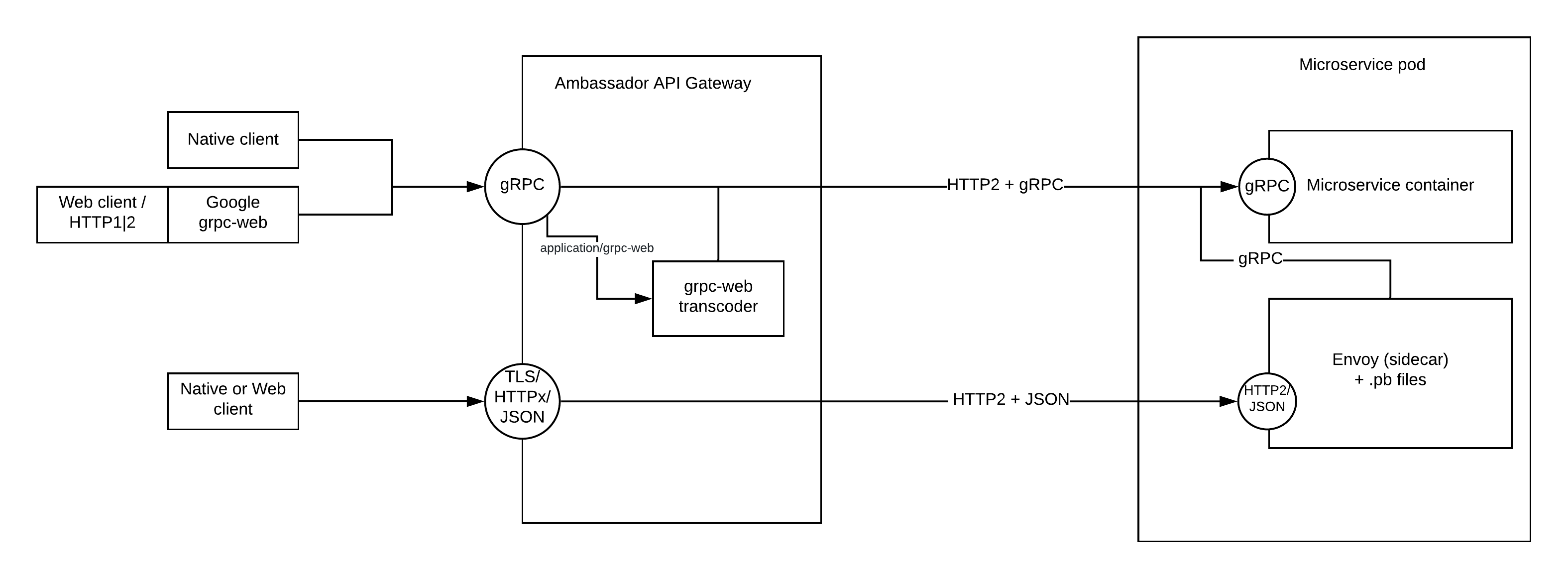
- Transcoding between gRPC-web and gRPC is provided by the API Gateway transparently.
- For a subset of the APIs, HTTP 1.x or HTTP/2 with JSON-formatted payload is supported using automatic transcoding.
Involved technologies include the following:
- Ambassador API Gateway.
- Nuance GlobalAuth service - OAuth2 authorization service.
- ORY Hydra.
- ORY Oathkeeper.
- Nuance Login and Consent provider microservice.
API architecture
All public APIs rely on the API Gateway to route the requests to the appropriate microservice, as defined through mappings. Inside the cluster, the microservices communicate between each other directly through their internal APIs without passing through the API Gateway. Internal APIs are also gRPC-based. Usually a HA load balancer fronts the Ambassador pods.
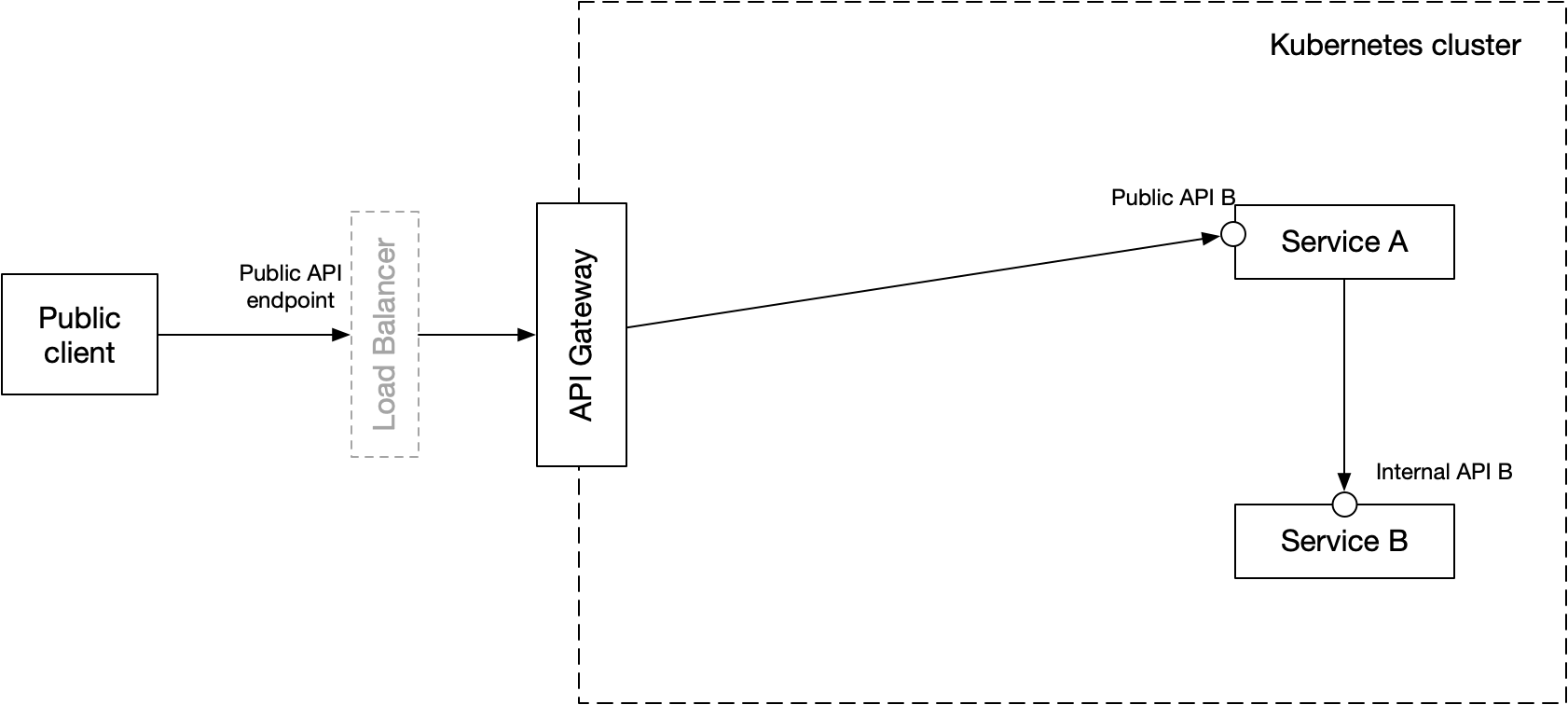
The definition of the public client is based on the fact that it uses the public API, not on its location in the network. The main responsibilities of the Ambassador are as follows:
- Termination of TLS
- Enforcing the access control and security
- Enforcing the rate limits
- Routing the requests to the microservices
- Providing logging and generating the unique request ID for tracing
- Protocol transcoding for gRPC-web
API bindings
In order to support different clients, Gatekeeper provides several protocol bindings.
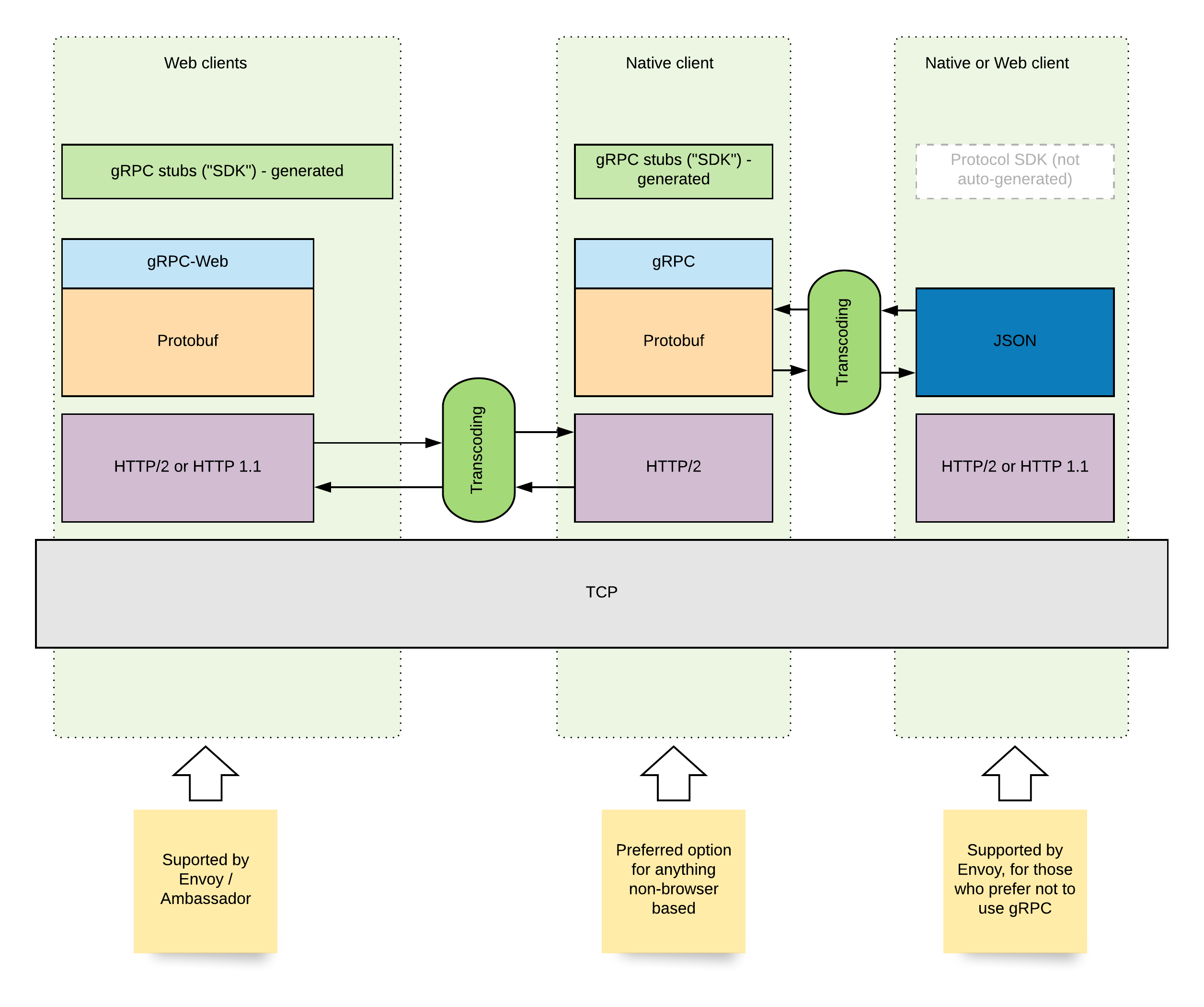
Native gRPC clients
Native gRPC clients use the standard gRPC client and server libraries.
Web applications
Web applications use another flavor of gRPC which packages the Protobuf frames into HTTP 1.x or HTTP/2 messages while being as close as possible to the original gRPC. Transcoding is required for these clients and is performed automatically by Ambassador (underlying Envoy proxy).
Other applications
Some APIs can be called using HTTP 1.x or HTTP/2 transport with JSON-encoded payload instead of gRPC. This is done using another transcoder that is packaged together with the microservices that support such binding.
Implementation
Ambassador natively supports gRPC and gRPC-web with its Envoy proxy (Ambassador is based on Envoy). For HTTP/JSON binding, Nuance bundles each microservice with a small sidecar Envoy instance containing the complied Protobuf files for the APIs implemented by the microservice in order to perform the transcoding to or from JSON.
API deployment
The diagram below shows the API deployment architecture for Gatekeeper and Nuance Media Manager.
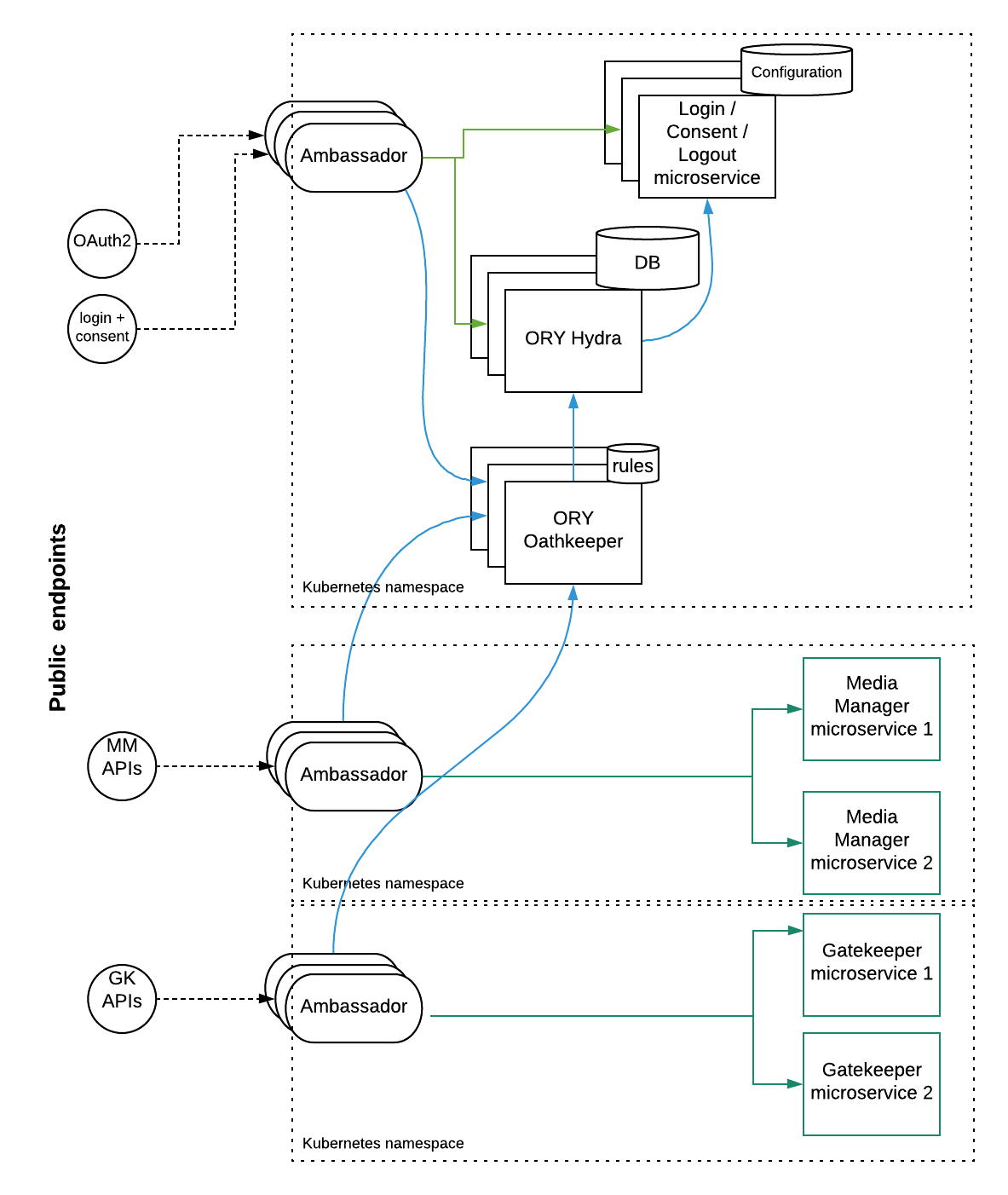
Each part of the product is deployed in its own Kubernetes namespace (for example GlobalAuth, Media Manager, and Gatekeeper ). GlobalAuth is a shared service used by both Media Manager and Gatekeeper (see Authentication and Authorization). Ambassador is deployed for each namespace independently. Each Ambassador deployment uses ORY Oathkeeper authorization proxy for validating the HTTP requests. Detailed information on this authorization process is available in the separate documents under this page. ORY Hydra is the OAuth2 server responsible for OAuth2 client and token management. Login/Consent/Logout microservice (often referred to as LnCP, Login & Consent Provider using ORY terminology) is the integration component responsible for handling consent requests and end user authentication. Microservices never communicate across namespaces directly with the exception of Ambassador calling Oathkeeper. When a microservice from one Kubernetes namespace needs to use another service from another namespace, it must go over the public API offered by the target service. It must acquire the OAuth2 token and call the public endpoint (for example go through Ambassador).
Deliver media to the API
This section refers to audio delivered from an IVR, mobile apps, or offline file processing. In most call center applications, audio is delivered through the Media Manager (see Media Manager).
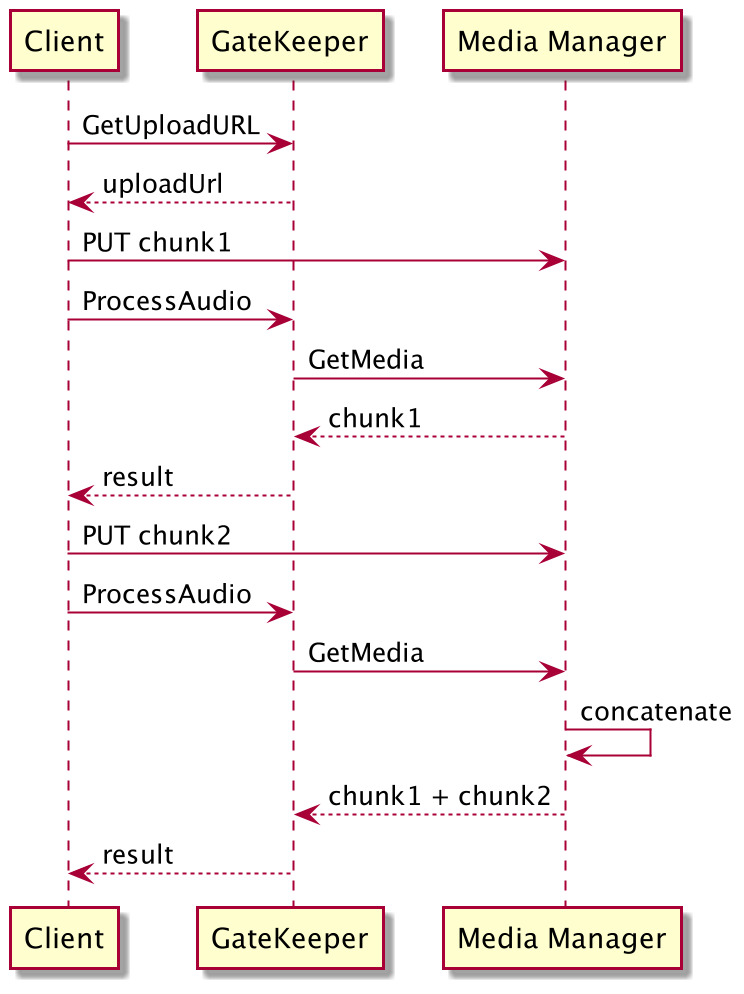
To deliver audio to the system call the GetUploadURL API method to get a temporary upload URL and the gk_media_segment_id. (The temporary URL expires after 15 minutes.) Use the URL to stream the binary audio buffer with a regular HTTP PUT request method. Then, apply the same gk_media_segment_id in subsequent API calls. For example, you can start by calling the ProcessAudio API method to check audio quality or create an audio model. Next, use the returned gk_processed_audio_id to reference the same audio in subsequent API calls.
Use one of the following mechanisms for audio that was already processed by the system:
- Set the value of the input parameter gk_media_segment_id to an identifier of the original (parent) media.
- Set the value of the input parameter gk_processed_audio_id to an ID of an already processed audio segment. Nuance recommends using this mechanism as it is more efficient because it uses an audio model that the system already created when first processing the media.
When delivering audio in blocks (not all at once), blocks are concatenated after processing the audio. In addition, when uploading multiple blocks without processing the audio the system overwrites the previously uploaded blocks. A detailed flow is as follows:
- Call
GetUploadUrlto receive a temporary upload URL and the gk_media_segment_id. - Upload a block of audio to the URL obtained in the previous step.
- Call
ProcessAudiousing the gk_media_segment_id obtained in the previous step. The method returns a new identifier gk_audio_processed_id. - Upload additional blocks of audio to the upload audio URL and repeat as needed.
- Call
ProcessAudiousing the gk_media_segment_id to re-process the audio. The method returns the sum gross audio of all processed audio blocks with the specified gk_media_segment_id.
General use cases
The Gatekeeper API is mainly meant to serve the following use cases.
Caller authentication in a contact center
The contact center API receives inputs asynchronously from multiple sources. It receives events from the CTI through the Media Manager, from the agent through the agent console, and processing results such as enrollment and verification results from the biometric engine. These events can be raised at any point in time during the call. Gatekeeper uses gRPC streams to communicate with the event sources (such as the Media Manager and the agent console). A typical flow is as follows:
- The agent registers to the system and is informed each time a call comes in. The connection persists throughout the Agent’s shift.
- Call events are propagated to Gatekeeper and the connection persists during the duration of the call. When a call comes in, the Agent can collect input and trigger various actions such as opting out or marking the call as suspicious. The Agent receives details about the caller and processing results from the back-end services.
- The processing workflow is determined by a business logic component that can be customized (see Call workflows).
Caller authentication through IVR, offline processing, or digital channels
The logic of the IVR and digital API is mainly implemented by the calling application (such as middleware, a mobile application, or a VoiceXML based IVR application). The API methods for performing biometric operations use a request and response model and are exposed in gRPC as well as RESTful APIs.
The API also contains methods for managing entities that can be consumed by any client application. Each entity has one or more identifiers. In most cases, the entity has a customer defined identifier that is received from the client application. This identifier is a string that may contain data in various formats (such as UUID as a string, employee ID as a string, and so on). In some cases (for example, when the identifier is a person ID), Gatekeeper handles the identifier as personal information and as such, Gatekeeper encrypts the data before saving it. The client application must verify that the identifier is unique within the scope (or tenant). In addition, each entity is identified by a unique Gatekeeper identifier in UUID format (The names of all Gatekeeper IDs begin with the characters gk_).
For details about Gatekeeper authorization see Authentication and Authorization.
Specific use cases
This topic describes callflow patterns for common usage scenarios. Nuance will add new patterns over time.
Add members to existing roles
Use the following callflow to add one or more members to an existing role:
- Get the scope ID (GetGkScopeId).
- Identify the needed role (ListRoles).
- Add user (AddMemberToRole), specifying the scope, role, issuer ID, member name, and member type.
Notes:
- MemberType is an enumerator that can indicate a single human, a group, or a client application.
Guidelines for using API data types
Following are some details and guidelines for the API data types:
- All request messages contain a context object that may include the engagement, session, scope, and configuration.
- All response messages return a status object with details about the operation’s results.
- The API uses field masks that allow specifying a sub-set of the fields you want to set or read when calling an API method. When updating an entity, the fieldmask is mandatory. Using field masks enhances efficiency and enables updating a sub-set of an entity’s fields, without modifying the current value of the other fields. When reading or creating an entity, the fieldmask is optional. In Create or Start API methods, if FieldMask is not set, the details section is ignored. In Update API methods, if FieldMast is not set, the method returns an error. In Read API methods, if FieldMask is not set, the API returns all fields within the details section.
- The API uses nullable data types in order to differentiate between values such as zero and unset fields that contain null.